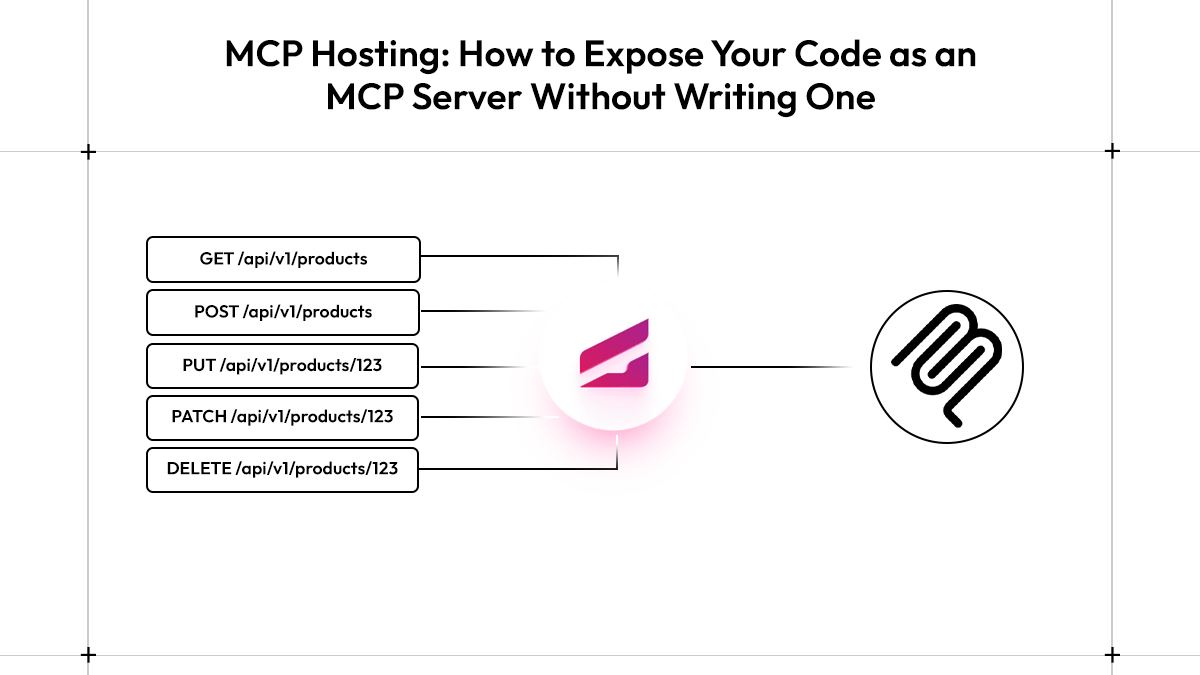
MCP Hosting: How to Expose Your Code as an MCP Server Without Writing One
/TABLE OF CONTENTS
/ARTICLE
/ARTICLE
[1]TLDR
- MCP is a discovery-first protocol, AI agents connect to your service and ask what tools are available at runtime, rather than calling hardcoded endpoints like a regular API client would
- Writing an MCP server from scratch means manually maintaining tool definitions, parameter schemas, and JSON-RPC plumbing separately from your actual code, every method change is an update in two places
- Graftcode Gateway eliminates that entirely, it runs alongside your service in Docker, introspects your exported classes on startup, and auto-exposes every public method as an MCP tool with no annotations required
- Cursor connects to the Gateway's MCP endpoint directly over HTTP/SSE; Claude Desktop requires
mcp-remoteas a stdio bridge since it doesn't support HTTP/SSE connections natively - A Project Key moves your setup from local dev to production, replacing
localhostwith a stable remote URL that persists across redeployments and adds access control to your MCP endpoint
MCP (Model Context Protocol) is an open standard that defines how AI agents communicate with external tools and services. Unlike a regular API call where the client already knows what endpoints exist, MCP lets an AI agent connect to a server and dynamically discover what it can do, what tools are available, what parameters they take, and how to call them. For Graftcode, MCP is one of two ways your service becomes callable from the outside: AI agents connect over MCP to discover and invoke your methods at runtime, while other services connect over port 80 through a strongly-typed Graft. This blog focuses on the MCP side, specifically, how Graftcode Gateway exposes your existing code as MCP tools without requiring you to write any MCP server code.
[2]Why Exposing Code over MCP Is Harder Than It Should Be
MCP hosting has become one of the more searched topics in backend development over the past year. AI coding assistants like Cursor and Claude are no longer just autocomplete tools, they're agents that can call real services, fetch live data, and execute logic on your behalf. The Model Context Protocol, released by Anthropic in November 2024, is the open standard that makes this possible. It defines how AI clients discover and invoke external tools in a structured, consistent way across any service.
The problem is what it takes to actually expose your code over MCP. Say you have a JavaScript class with a few public methods, something that calculates energy prices or wraps a third-party API. To make that callable by an AI agent, you'd normally write a full MCP server: define each tool explicitly, annotate parameter schemas, and handle the JSON-RPC message lifecycle. For a two-method class, that's a disproportionate amount of infrastructure. To understand why, it helps to look at what a compliant MCP server actually has to do.
[3]What a Compliant MCP Server Actually Has to Implement
Building an MCP server means implementing a defined communication contract between your service and any AI client that connects to it. That contract runs over JSON-RPC 2.0, with every message, whether a tool discovery request or a method invocation, exchanged over one of two supported transports:
- stdio: the server runs as a local subprocess, and the client communicates with it over standard input/output. Most desktop AI tools like Claude Desktop use this by default.
- HTTP/SSE: the server runs as a persistent HTTP service. The client sends requests over HTTP and receives responses via Server-Sent Events. This is the transport you'd use for a remotely deployed service.
Beyond transport, a compliant MCP server has to handle three things correctly:
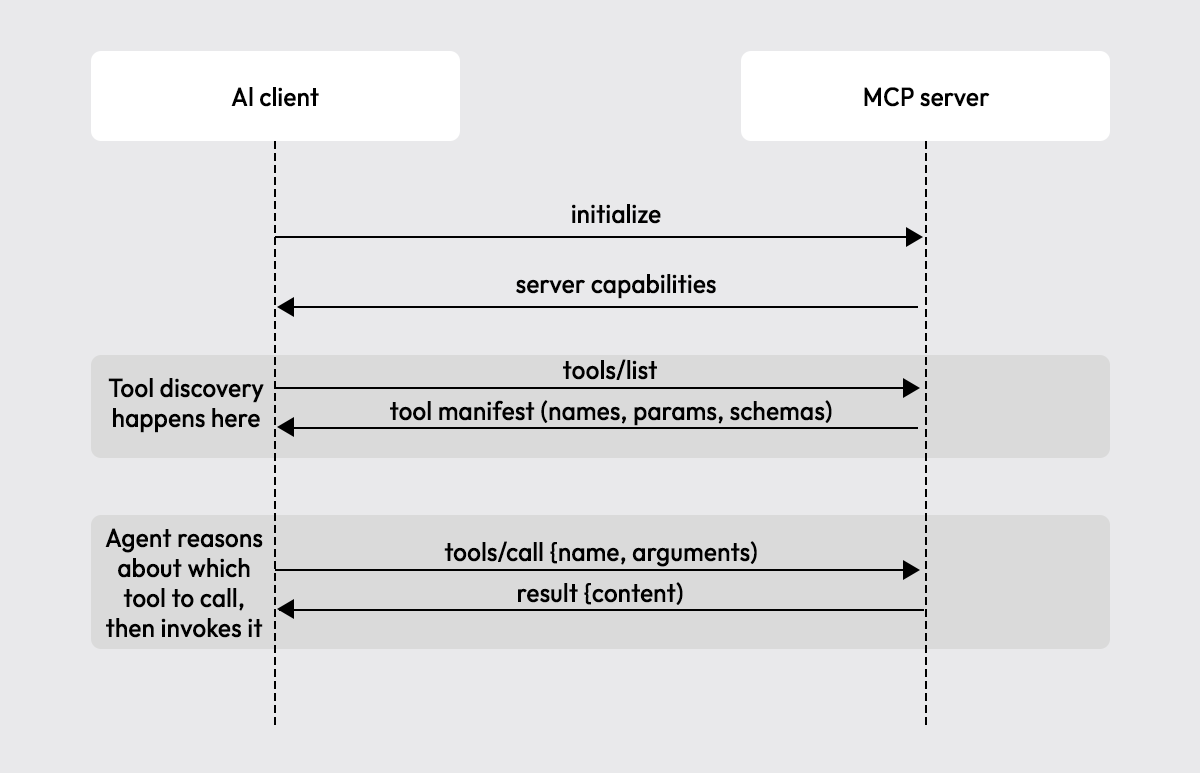
- Tool announcement: on connection, the server must respond to a
tools/listrequest with a full description of every available tool: its name, what it does, and the JSON Schema for each parameter. - Tool invocation: the server must handle
tools/callrequests, route them to the right function, and return a structured result. - Error handling: malformed calls, missing parameters, and runtime failures all need to return well-formed JSON-RPC error objects, not raw exceptions.
The left side is what you'd build and maintain by hand, four separate layers, each needing updates every time your code changes. The right side is the same outcome with Graftcode Gateway handling everything below your module automatically.
Writing this from scratch means maintaining tool definitions separately from your actual code. Add a parameter to a method and you update it in two places. Rename a method and the tool definition drifts. For a small service with stable methods this is manageable, for anything that evolves quickly, it becomes a maintenance burden almost immediately.
[4]Three Things You Need to Expose Code over MCP
Most of the complexity in MCP hosting comes down to three requirements that any compliant setup needs to satisfy, regardless of whether you write the server yourself or use a gateway.
- A runnable process or container: Your code needs to run somewhere persistent. For local development this is straightforward, a Node.js process or a Docker container on your machine. For production, it's a deployed container that stays alive between agent calls. The MCP server lives inside this process, listening for incoming connections.
- A stable endpoint: The AI client needs to know where to connect. For stdio-based tools like Claude Desktop, this is a local subprocess command. For HTTP/SSE-based connections like Cursor, it's a URL, typically something like
http://localhost:81/mcplocally, or a permanent remote URL in production. Without a stable endpoint, every redeployment breaks the client configuration. - Tool discovery: This is where most of the manual work lives. The AI client connects and immediately asks what tools are available. Something has to respond to that
tools/listrequest with each tool's name, description, and full parameter schema. In a hand-written MCP server, you define all of this explicitly. With Graftcode Gateway, it reads your module's public methods and generates the tool definitions automatically.
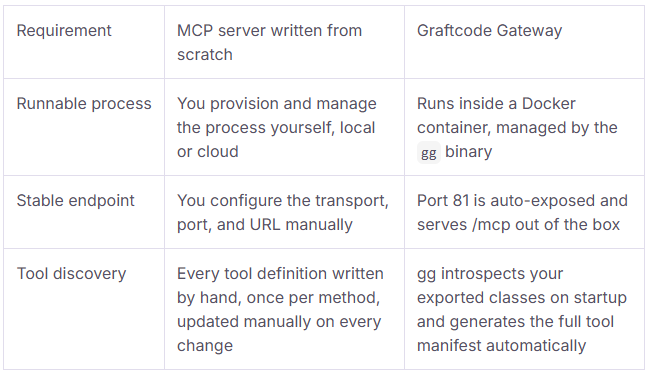
Of the three requirements, tool discovery is the one that never stays finished. Every time a method is added, renamed, or removed, the tool definitions need a matching update, separately from the code change itself. In a service that evolves quickly, that gap between your code and its tool manifest is where things break. That's exactly the problem Graftcode Gateway is built to eliminate.
[5]How Graftcode Gateway Auto-Exposes Your Module as MCP Tools
Graftcode Gateway (gg) is a binary that runs alongside your service inside a Docker container. When it starts, it reads your package.json, inspects all public methods across your exported classes, and automatically exposes them, as MCP tools for AI agents and as callable methods for other services that have installed a Graft . No decorators, no schema files, no tool definitions. Any public method you write becomes callable through MCP the moment the container starts.
The setup takes four steps.
Step 1: Write your module
Create a project folder and initialize a Node.js project:
mkdir js-ai-backendcd js-ai-backendnpm init -y
Then create index.js with your business logic as a plain class:
class EnergyPriceCalculator {static getPrice() {return Math.floor(Math.random() * 5) + 100;}static calculateBill(kwhUsed) {const pricePerKwh = Math.floor(Math.random() * 5) + 100;return kwhUsed * pricePerKwh;}}module.exports = { EnergyPriceCalculator };
No MCP-specific annotations anywhere. getPrice() and calculateBill() are plain static methods, Graftcode Gateway handles the rest.
Step 2: Add the Dockerfile
Create a Dockerfile in the project root:
FROM node:24ARG TARGETARCHWORKDIR /usr/appCOPY . /usr/app/RUN apt-get update \&& apt-get install -y wget \&& wget -O /usr/app/gg.deb "https://github.com/grft-dev/graftcode-gateway/releases/latest/download/gg_linux_${TARGETARCH}.deb" \&& dpkg -i /usr/app/gg.deb \&& rm /usr/app/gg.deb \&& apt-get clean \&& rm -rf /var/lib/apt/lists/*EXPOSE 80EXPOSE 81CMD ["gg", "./package.json"]
Two ports matter here:
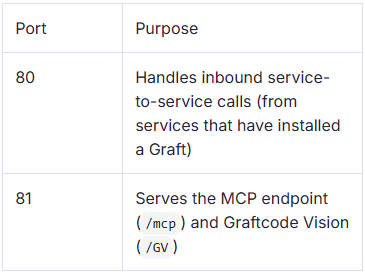
The container runs two components: your module and the gg binary. On startup, gg reads package.json to locate the entry point, introspects all exported classes, and takes ownership of both ports, port 80 accepts inbound calls from other services that have installed a Graft, while port 81 serves the MCP endpoint and Graftcode Vision side by side.
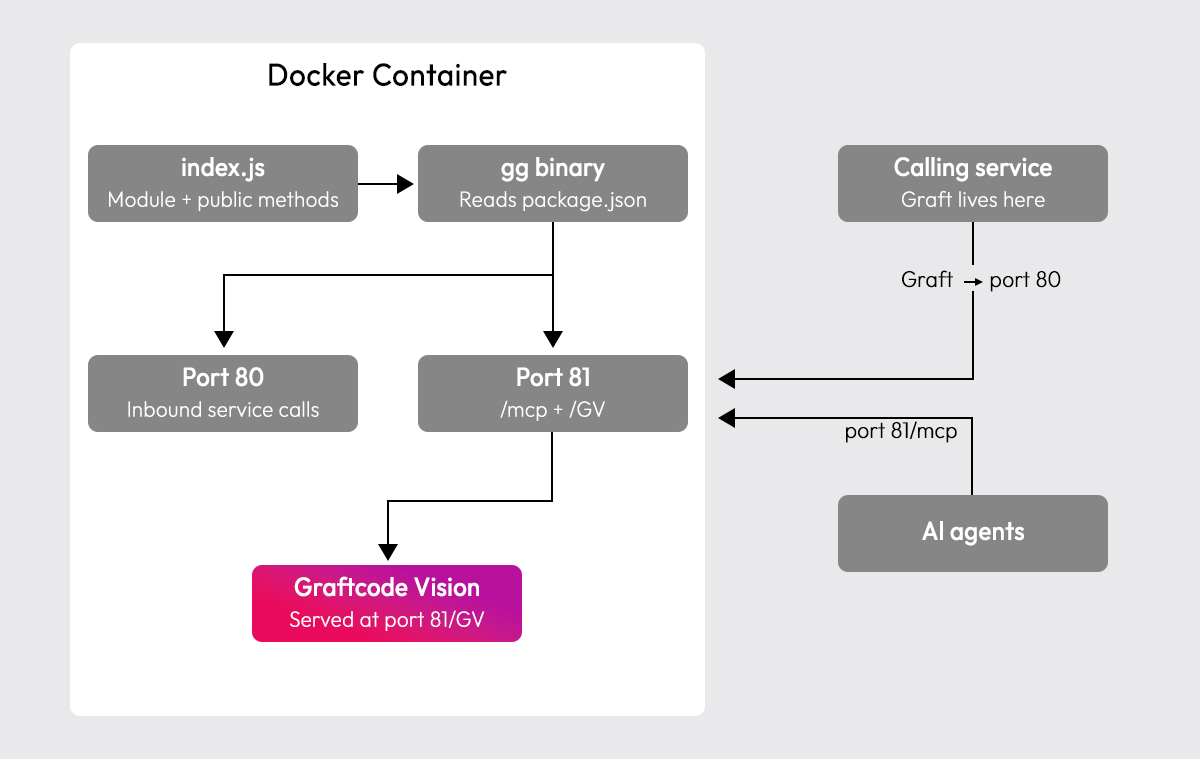
gg reads package.json on startup to locate your entry point, then introspects the exported classes to build the tool manifest automatically.
Step 3: Build and run the container
docker build --no-cache --pull -t js-ai-backend:test .docker run -d -p 80:80 -p 81:81 --name graftcode_mcp_demo js-ai-backend:test
Your service is now running with an MCP endpoint live at http://localhost:81/mcp.
Step 4: Inspect your tools in Graftcode Vision
Open http://localhost:81/GV in your browser. Graftcode Vision lists every public method that gg discovered, with parameter types, return types, and a live "Try it out" button to call methods directly from the browser before connecting any AI tool.
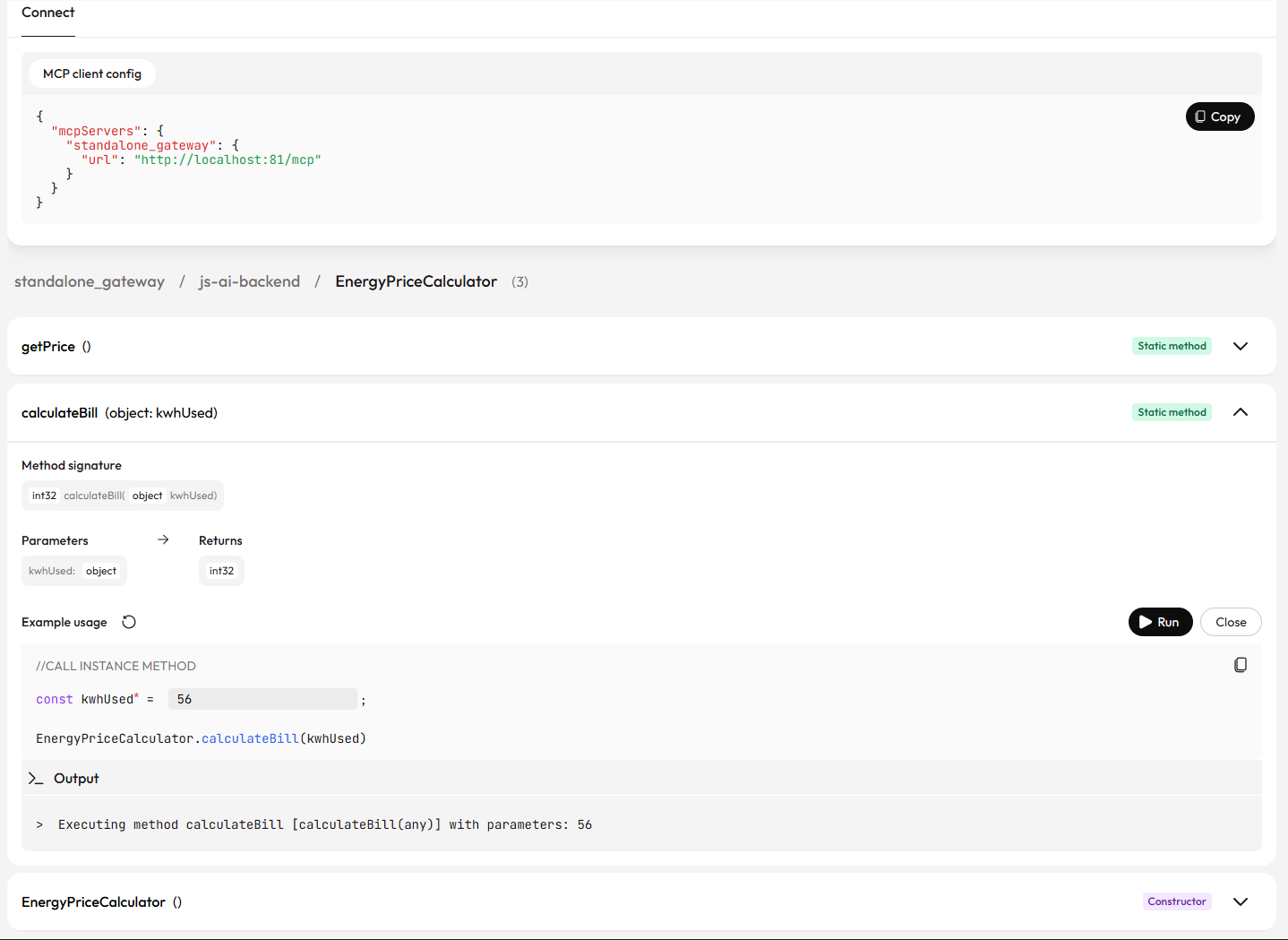
This is a useful checkpoint before wiring up Cursor or Claude Desktop, if a method appears here with the right signature, it will appear identically as an MCP tool in your AI client.
[6]Connecting Cursor and Claude Desktop to Your MCP Endpoint
With the container running, the MCP endpoint at http://localhost:81/mcp is ready to accept connections. How you point your AI tool at it depends on which client you're using, the two most common are Cursor and Claude Desktop, and they handle MCP connections differently.
Connecting Cursor
Cursor supports HTTP/SSE-based MCP connections natively. Create or edit .cursor/mcp.json in your project root:
{"mcpServers": {"energy-service": {"url": "http://localhost:81/mcp"}}}
Alternatively, navigate to File > Preferences > Cursor Settings > Tools & MCP and add the server definition from there. Once saved, Cursor connects to the endpoint, runs tool discovery, and makes your methods available as callable tools in the agent context.
Connecting Claude Desktop
Claude Desktop only supports stdio-based MCP connections, it can't connect to an HTTP/SSE endpoint directly. To bridge this, use mcp-remote, a lightweight npm package that proxies an HTTP MCP endpoint over stdio. Edit your claude\_desktop\_config.json (open it from Claude > Settings > Developer > Edit Config):
{"mcpServers": {"energy-service": {"command": "npx","args": ["-y","mcp-remote","http://localhost:81/mcp"]}}}
Restart Claude Desktop after saving. mcp-remote spawns as a local subprocess, bridges the stdio connection to your HTTP endpoint, and Claude Desktop sees your methods as native MCP tools.
What happens at connection
The transport difference between Cursor and Claude Desktop is the only thing that changes, the tool manifest both clients receive is identical. Once connected, both see the same method names, parameter types, and return types that Graftcode Gateway discovered from your module.
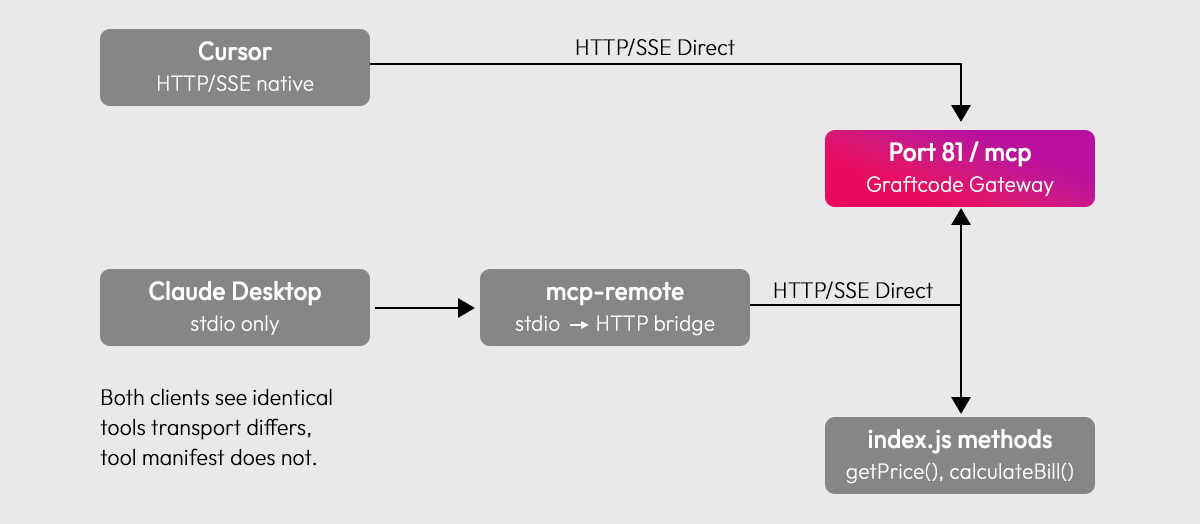
Regardless of which client you use, the connection flow is the same:
- The client connects and sends a
tools/listrequest - Graftcode Gateway responds with every discovered method, name, description, and parameter schema
- The client registers these as callable tools in the agent context
- When the agent decides to call a method, it sends a
tools/callrequest with the resolved parameter values - The Gateway routes the call to the right method and returns the result
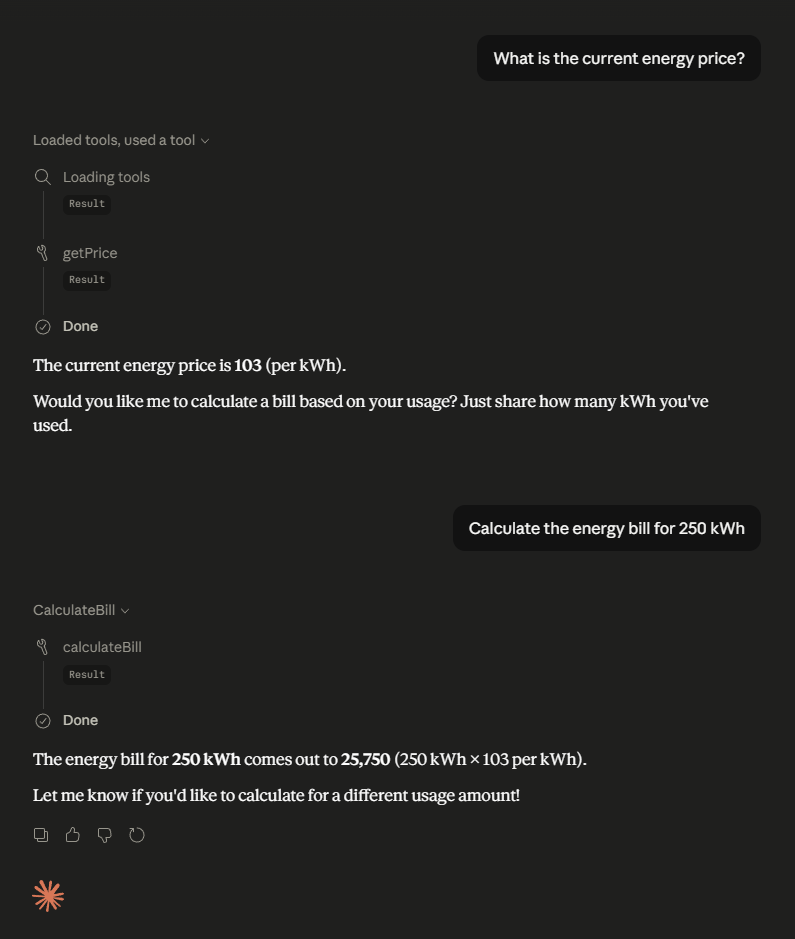
To test it, open your AI tool and ask it to use your service:
"What is the current energy price?"
The agent discovers EnergyPriceCalculator.getPrice() through the tool manifest and calls it directly. No prompt engineering, no hardcoded function references.
[7]Taking Your MCP Endpoint from Local Dev to Production
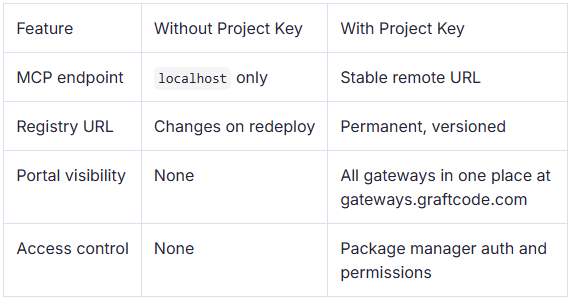
Everything covered so far works without any account or configuration beyond Docker. For local development and testing, that's enough. For a real deployment, where your MCP endpoint needs to stay stable across redeployments, be accessible to teammates, and have access control, you'll need a Project Key.
Setting up a Project Key
Create a free account at portal.graftcode.com, set up a project, and copy its Project Key. Then pass it as a flag in your Dockerfile's CMD:
CMD ["gg", "./package.json", "--projectKey", "YOUR_PROJECT_KEY"]
That's the only change to your setup. Same Dockerfile, same container, same public methods, the Project Key just unlocks what the Gateway registers and exposes externally.
What a Project Key gives you
Updating your AI tool config for production
Once deployed with a Project Key, your MCP endpoint moves from http://localhost:81/mcp to a stable remote URL provided by the portal. Update your Cursor or Claude Desktop config to point at that URL, and unlike a raw IP or ephemeral container address, this URL stays the same across every future redeployment.
[8]Choosing Between a Gateway and a Hand-Written MCP Server
For most backend services, Graftcode Gateway covers everything needed to get code in front of an AI agent. That said, there are cases where writing an MCP server from scratch makes more sense. The decision comes down to how much control you need over the protocol layer.
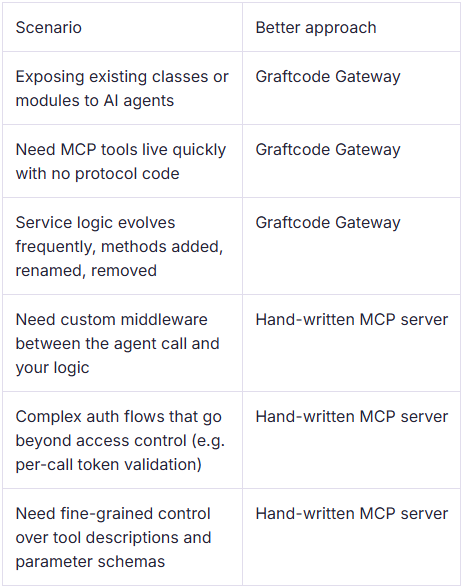
The gateway approach works best when your public methods already represent the right level of granularity for an agent to call. If your service needs significant transformation between what the agent sends and what your code expects, or if you need to intercept calls for logging, rate limiting, or custom validation, a hand-written server gives you the control points to do that cleanly.
[9]Conclusion: Getting Your Existing Code in Front of AI Agents
MCP hosting doesn't have to mean building and maintaining a separate server alongside your actual service. The protocol overhead, tool definitions, schema annotations, JSON-RPC plumbing, exists to give AI agents a consistent interface to discover and call your code. Graftcode Gateway handles all of that automatically from your existing module, so the gap between a working JavaScript class and an AI-callable MCP tool is just a Dockerfile and a running container.
From here, a natural next step is exploring how Graftcode Gateway handles service-to-service calls beyond MCP, where other services can install a Graft, a strongly-typed interface generated in the calling service, and call those same methods directly, without REST endpoints or proto files. The Graftcode Academy covers the full range of what the Gateway exposes, from frontend-to-backend connections to cross-runtime microservice communication.
[10]FAQs
Can I use Graftcode Gateway to expose MCP tools from a Python or other non-JavaScript service?
The quick start covered here uses JavaScript, but Graftcode supports 20 programming languages and 10 package managers. The same Gateway-based MCP exposure works across runtimes, the gg binary reads your module's entry point and introspects public methods regardless of language.
Does MCP hosting require a cloud server, or can it run entirely on-premise?
MCP servers can run anywhere a container runs, local machine, on-premise server, or cloud. Graftcode Gateway doesn't require an external host. The Project Key adds a stable remote URL and portal visibility, but the Gateway itself runs entirely within your own infrastructure.
What is the difference between MCP tools and function calling in OpenAI's API?
Both let AI models invoke external functions, but function calling is provider-specific, you define tools per-request in the API payload. MCP is a transport-level open standard where the server itself advertises available tools at connection time, making it reusable across any MCP-compatible client regardless of the underlying model.
How does MCP handle authentication between an AI agent and an MCP server?
The MCP spec classifies servers as OAuth Resource Servers as of the June 2025 authorization update, requiring clients to implement Resource Indicators per RFC 8707. Without a Project Key, Graftcode Gateway exposes the MCP endpoint with no auth layer, suitable for local dev. With a Project Key, access control is managed through permissions configured in the portal.
Can multiple AI agents connect to the same MCP server endpoint simultaneously?
Yes. An HTTP/SSE-based MCP endpoint handles concurrent connections, each agent opens its own session, runs tool discovery independently, and invokes tools without affecting other active sessions. stdio-based connections are process-scoped and don't support concurrent clients, which is why HTTP/SSE is the preferred transport for any shared or production MCP deployment.
/WRITTEN BY